



PingTrace for Windows
- Trial version
- 4.2
- 5
- V3.0.0
Download for Windows
View an ad to download for free

- Ashkon Software LLC
- More programs (15)
Advanced ping and tracert / traceroute utility for Windows
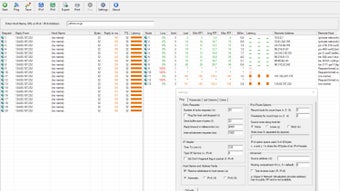
PingTrace puts ping and traceroute side by side in one window. Enter a host name, a URL or an IPv4 / IPv6 address and click Start: the left list pings the host and shows every reply with its time, TTL and a latency bar, while the right list traces the route and shows every router on the path with its packet loss, last, minimum, average and maximum round-trip time, jitter and a latency graph. You see at once whether the destination answers and where on the path delay or loss begins.
Switch on Continuous Traceroute (MTR) to trace the route again and again and keep running statistics for every hop, the way the popular mtr tool does on Linux and macOS. Set the number of cycles or let it run until stopped. Sent, Loss, Last, Min, Avg, Max and StDev are updated with every cycle, and a sparkline of the latest probes shows spikes and drops at a glance. This is the best way to catch intermittent packet loss behind a stuttering video call or a lagging game.
PingTrace also shows who operates each hop: the reverse DNS name of the router, the AS number and AS name of its network, the announced BGP prefix, the country and the regional registry. Private, CGNAT and other special address ranges are labeled, so you can see where your local network ends and your provider hands traffic to another network. Right-click any address to view its Whois / RDAP registration data, including the owner, network range and abuse contacts.
A host that does not answer ping is not necessarily down. The built-in TCP Port Check connects to the ports you list (for example 80, 443, 3389 or a range such as 8000-8010, up to 1024 ports) and reports each one as Open, Closed or Filtered, with the connect time and the IANA service name.
All options of the Windows ping and tracert commands are available in one Settings dialog: number of requests or ping until stopped, buffer size, timeout, interval, TTL, TOS, Don't Fragment, record route, timestamps, source routing, source address, maximum hops, probes per hop and more. Latency and packet loss are colored green, yellow, orange and red by thresholds you choose. Show or hide any of the 9 ping and 17 traceroute columns and sort by any column.
Export the ping list, the traceroute list or both to a CSV or tab-separated file, ready to attach to a support ticket for your Internet or hosting provider, or print them. PingTrace can minimize to the system tray, flush the Windows DNS cache and open the host in your web browser.
Loading…
App specs
Developer
- Ashkon Software LLC
- More programs (15)
License
Trial version
Version
3.0.0
Latest update
Platform
Windows
OS
Windows 10
Language
English
Downloads
5
Last month's downloads
- 5
Size
3.26 MB
PingTrace for PC
- Trial version
- 4.2
- 5
- V3.0.0
Download for PC
View an ad to download for free
User reviews about PingTrace
Have you tried PingTrace? Be the first to leave your opinion!
Add reviewTop downloads Networking for Windows
Top downloads Networking for Windows

PuTTY
A lightweight terminal for secure remote connections

WO Mic
Turn your phone into a computer mic

Remote Desktop Connection
Download Microsoft Remote Desktop Connection for Windows

Wireshark
Free and powerful network analyzer
SG TCP Optimizer
Find the optimum configuration settings for your Internet connection
Top downloads Networking for Windows
PuTTY
A lightweight terminal for secure remote connections
WO Mic
Turn your phone into a computer mic
Remote Desktop Connection
Download Microsoft Remote Desktop Connection for Windows

Cisco Packet Tracer
Where networks are built before they exist

FreeProxy
Free software to share Internet connections between two or more users
Related topics about PingTrace
Latest articles

iOS 27.2 will bring these two major changes to the HomePod

Do you share Spotify with friends? There’s a new measure that could block your account, but there’s a solution.

God of War is official at Prime Video: Amazon orders series

Street Fighter’s Justin Wong cameo: director says the film is for fans first

Final Porta wireless headphones are now up for preorder: just 40g
Laws concerning the use of this software vary from country to country. We do not encourage or condone the use of this program if it is in violation of these laws. Softonic may receive a referral fee if you click or buy any of the products featured here.